

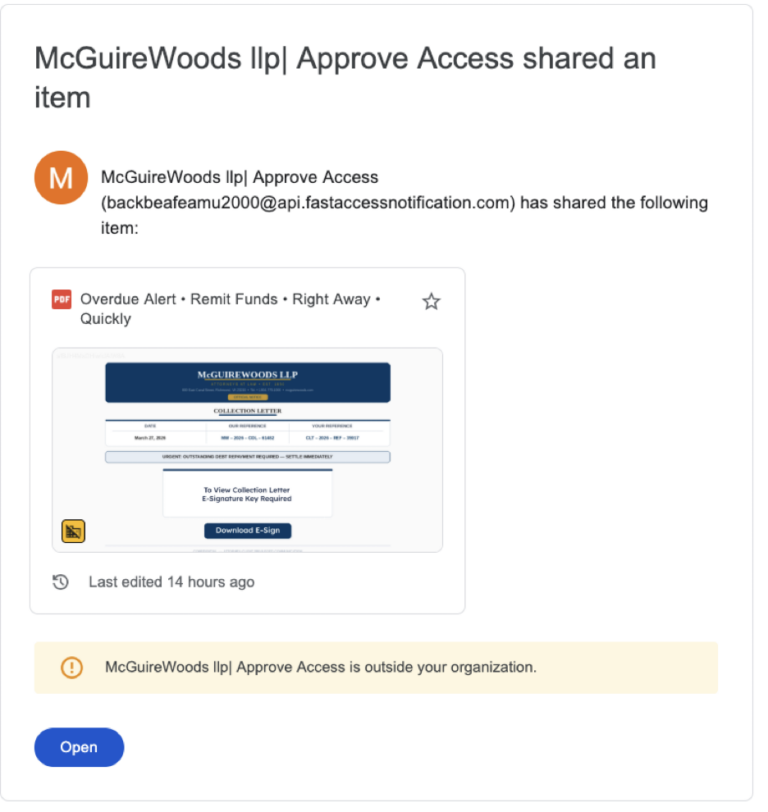
A fraudulent email campaign impersonating McGuireWoods LLP, one of the world’s leading law firms, is underway. This scam, though previously observed, has returned and is again being actively used in attacks. The message uses a spoofed sender name, a fake file-sharing notification, and an urgency-driven document designed to deceive recipients into clicking a malicious link or downloading an unauthorized file.
The message is a scam.
About McGuireWoods LLP
McGuireWoods LLP is an international law firm headquartered in Richmond, Virginia, with more than 1,100 lawyers across 21 offices in the United States, Europe, and Asia. Founded in 1834, the firm serves corporate, individual, and nonprofit clients across a broad range of practices including corporate finance, litigation, healthcare, labor and employment, and government affairs. McGuireWoods has no affiliation with this fraudulent campaign.
What the Fraudulent Email Looks Like
Recipients receive what appears to be a Google Drive file-sharing notification. Key details from the fraudulent message:
- Subject line: “McGuireWoods llp| Approve Access shared an item”
- Sender display name: “McGuireWoods llp| Approve Access”
- Actual sender address: [email protected]
- Shared document title: “Overdue Alert • Remit Funds • Right Away • Quickly”
- Document content: A fake McGuireWoods letterhead “Collection Letter” stating “URGENT: OUTSTANDING DEBT REPAYMENT REQUIRED — SETTLE IMMEDIATELY” with a “Download E-Sign” button.
Why This Message Is a Scam
This campaign uses several tactics common to brand impersonation scams. CheckTxt analysis identified the following fraud indicators:
- Spoofed sender domain. The message originates from “api.fastaccessnotification.com,” which has no affiliation with McGuireWoods. The display name is crafted to mask this.
- Homoglyph spoofing. The firm’s name uses visually similar but non-standard Unicode characters designed to evade automated spam filters and brand-name detection.
- Fabricated urgency. Language such as “Overdue Alert,” “Remit Funds,” and “SETTLE IMMEDIATELY” is designed to pressure recipients into acting before they verify.
- Weaponized Google Drive notification. Attackers use legitimate-looking file-sharing emails to host malicious documents and bypass spam filters.
- External organization warning. The email client itself flags the sender as “outside your organization” — a signal that should raise immediate suspicion.
- Fake e-signature prompt. The “Download E-Sign” button is a common tactic used to capture credentials or deploy malware under the appearance of a legitimate business action.
What to Do If You Receive This Message
- Do not click any links or the “Download E-Sign” button.
- Do not open the shared document.
- Do not reply or provide any personal or financial information.
- Delete the message immediately.
If you need to contact McGuireWoods LLP for a legitimate matter, do so directly through the firm’s official website at mcguirewoods.com.
Verify a Suspicious Message with CheckTxt
If you receive a suspicious email or text message, forward it to CheckTxt for real-time analysis.
Email: [email protected] Text or screenshot: 442-432-5898
Report Suspicious Messages to CheckTxt
If you receive a suspicious SMS or email message, you can submit it to CheckTxt for rapid analysis.
- Forward a text or send a screenshot → 442-432-5898
- Forward an email or send a screenshot → [email protected]